
Best IPTV Subscription Service: Features & Pricing
Par tech blog · 10 octobre 2026 · 9 min

Introduction
Finding the best IPTV subscription service can be challenging because providers offer different channel packages, streaming features, subscription prices, and device compatibility. Some focus on live television and sports, while others emphasize movies, international channels, or on-demand entertainment.
The right service depends on your viewing habits, location, internet connection, and budget. Instead of choosing a provider simply because it advertises thousands of channels, consider streaming reliability, content availability, customer support, and whether it has permission to distribute the programs it offers.
In this guide, we explain how to compare IPTV subscriptions, which features matter most, how to avoid common mistakes, and what to check before purchasing a plan.
What Is an IPTV Subscription Service?
Internet Protocol Television (IPTV) is a technology that delivers television content through internet networks instead of relying exclusively on traditional cable, satellite, or terrestrial broadcasting.
An IPTV subscription typically provides access to a package of television channels or other video content for a recurring fee. Depending on the provider, the package may include live television, movies, television series, sports, news, and international programming.
Common IPTV features include:
- Live TV: Watch scheduled television broadcasts over the internet.
- Video on demand (VOD): Select movies and series to watch when convenient.
- Electronic Program Guide (EPG): Browse schedules and program information.
- HD and 4K streaming: Access supported content at higher resolutions.
- Multi-device support: Watch on compatible televisions, phones, tablets, or streaming devices.
- Catch-up television: Replay certain programs when the provider supports this feature.
These features vary by service, and not every subscription includes all of them.
What Makes the Best IPTV Subscription Service?
The best option is not necessarily the cheapest or the one with the largest advertised channel list. A quality subscription should offer a dependable viewing experience and clear information about what customers receive.
1. Reliable Streaming Quality
Streaming stability should be a primary consideration. Frequent buffering, frozen images, and unavailable channels can make even an inexpensive subscription frustrating.
Look for a provider that explains its technical requirements and offers a legitimate way to test compatibility. Remember that playback also depends on your internet connection, home network, device, and the provider’s infrastructure.
2. Licensed Content and Transparency
Choose a service that can explain its content rights, business identity, subscription terms, and customer-support arrangements.
IPTV technology is not inherently illegal, but providers need appropriate authorization to distribute the television channels, films, and series they offer. A large content catalog alone does not establish that a service is legitimate.
3. Compatible Devices
Before paying, confirm that the service works with your preferred device. Common IPTV-compatible platforms include Android TV, Google TV, supported Smart TVs, streaming boxes, smartphones, tablets, and computers.
Some services operate through their own applications, while others require a compatible player. Check the provider’s official setup instructions and supported operating systems.
4. Useful Channel Selection
A good subscription should include the content you actually watch. Depending on your preferences, that may mean local television, international news, sports, children’s programming, documentaries, or entertainment channels.
Check channel availability for your country and language. Also verify whether advertised channels are included in your chosen plan and whether the provider is authorized to distribute them.
5. Responsive Customer Support
Helpful customer service can make installation and troubleshooting easier. Look for clear contact details, setup documentation, realistic response expectations, and published refund or cancellation policies.
Be cautious of providers that make unrealistic guarantees or provide no meaningful information about the company behind the service.
How to Compare IPTV Subscription Plans
Comparing subscriptions side by side can help you identify the best value for your needs.
| Feature | What to Check |
|---|---|
| Subscription price | Total cost, renewal charges, and payment terms |
| Plan duration | Monthly, quarterly, or annual options |
| Live channels | Relevant channels available in your region |
| Movies and series | Selection, availability, and content rights |
| Streaming quality | Supported resolutions and actual playback performance |
| Device support | Compatibility with your television or streaming device |
| Simultaneous streams | Number of permitted active connections |
| Customer support | Contact methods and setup assistance |
| Refund policy | Eligibility, conditions, and cancellation procedure |
Do not compare plans on price alone. A cheaper subscription may have fewer relevant channels, limited device support, or less transparent terms.
How Much Does an IPTV Subscription Cost?
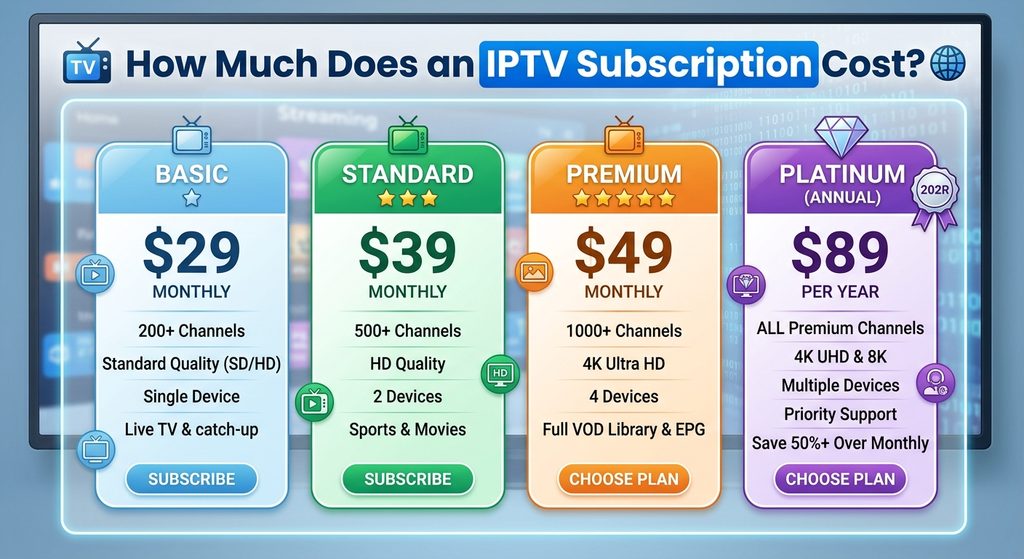
IPTV subscription prices vary depending on the provider, country, content package, subscription duration, and number of simultaneous connections.
Monthly plans generally require a smaller initial commitment, while longer plans may advertise a lower average monthly price. However, an annual subscription can carry greater financial risk if the service becomes unavailable or does not meet expectations.
Before purchasing, calculate the total cost rather than relying only on promotional pricing.
For example, compare a monthly plan with a yearly plan by considering:
- Total payment over the same period.
- Any setup or activation fees.
- Renewal prices after promotional offers expire.
- Refund eligibility and cancellation terms.
- Whether multiple household members can stream simultaneously.
Choose a plan that fits your budget without requiring you to commit more money than you are comfortable risking.
How to Set Up an IPTV Subscription
The setup process depends on the provider and your device, but the general steps are straightforward.
Step 1: Check Device Compatibility
Identify your television model, streaming device, or operating system. Review the provider’s official compatibility information before purchasing.
Step 2: Select a Suitable Plan
Compare the channel package, supported connections, payment terms, and cancellation policy. Confirm that the service is authorized to distribute the content you want to watch.
Step 3: Install the Required Application
Download the provider’s official application or a compatible IPTV player from a trusted source. Avoid unofficial downloads that could contain unwanted or harmful software.
Step 4: Enter Your Authorized Login Details
Follow the provider’s instructions to sign in or configure the service. Only use credentials and playlists supplied through an authorized subscription.
Step 5: Test Playback
Check channel loading, audio, video quality, subtitles, and program information. Test both wired and wireless connections if your device supports them.
If problems occur, consult the provider’s setup documentation and troubleshoot your home network before assuming the subscription itself is responsible.
What Internet Speed Is Best for IPTV?
The required internet speed depends on the video resolution, compression, network conditions, and number of devices using the connection.
As a general starting point, a stable connection of around 5–10 Mbps per stream may be sufficient for many HD viewing situations, while 4K streaming often benefits from 15–25 Mbps or more per stream. Actual requirements vary, so follow the streaming provider’s recommendations.
For better performance:
- Use Ethernet when practical.
- Place your Wi-Fi router in a central location.
- Reduce unnecessary network congestion.
- Keep your streaming device and applications updated.
- Test your connection at the times you usually watch television.
A fast internet package cannot completely prevent buffering if the service has server-side problems or the home network is unreliable.
Common Mistakes When Choosing an IPTV Service
Focusing Only on Channel Numbers
A provider advertising an enormous catalog may still lack your preferred channels. Check the actual channel list and prioritize relevant, licensed content.
Paying for a Long Plan Too Early
Avoid committing to an expensive annual subscription before checking the provider’s legitimacy, terms, compatibility, and performance. Start with a shorter plan or trial if available.
Ignoring Device Restrictions
Some subscriptions limit the number of simultaneous streams or support only certain applications. Verify these restrictions before purchasing.
Overlooking Renewal Terms
Promotional prices may not apply to future billing periods. Read the renewal and cancellation conditions carefully.
Trusting Unverified Reviews
Look for detailed, independent reviews that explain testing methods and limitations. Treat anonymous testimonials, copied reviews, and extraordinary performance claims cautiously.
Key Takeaways
- The best IPTV subscription service balances reliability, relevant content, compatibility, support, and fair pricing.
- IPTV delivers television over internet networks, but content licensing must be assessed separately.
- Compare subscription terms, device restrictions, simultaneous streams, and refund policies before paying.
- A stable internet connection and compatible device are essential for good playback.
- Longer plans are not automatically better value if the provider has not been adequately evaluated.
- Prioritize transparent providers with documented content rights and clear customer-support arrangements.
Frequently Asked Questions
1. What is the best IPTV subscription service?
The best service depends on your location, preferred channels, budget, devices, and viewing habits. Compare content licensing, streaming reliability, customer support, and cancellation terms before deciding.
2. Is an IPTV subscription legal?
IPTV is a legitimate content-delivery technology. However, a subscription service must have appropriate rights to distribute the channels and programs it provides. Check the provider’s licensing and business information.
3. Can I watch IPTV on a Smart TV?
Many IPTV services support compatible Smart TVs, Android TV devices, and streaming boxes. Support varies by manufacturer, model, operating system, and application, so verify compatibility before purchasing.
4. Does IPTV include live sports?
Some authorized IPTV services offer sports channels and live sporting events. Availability depends on regional broadcasting rights, the provider’s agreements, and the subscription package.
5. Is 4K streaming available with IPTV?
Some services offer 4K content, but availability depends on the specific program, source quality, device, and internet connection. A 4K-capable television alone does not guarantee that a stream will be delivered in 4K.
6. Should I choose a monthly or annual subscription?
A monthly subscription usually involves less upfront risk and makes it easier to evaluate the service. Annual plans may offer discounts, but compare the total cost and refund conditions before committing.
7. Why does IPTV keep buffering?
Buffering can result from weak Wi-Fi, network congestion, insufficient bandwidth, device limitations, or provider-side problems. Test your connection, restart the application, and consult the provider’s troubleshooting guidance.
8. Can I use one IPTV subscription on multiple devices?
That depends on the subscription terms. Some providers allow several registered devices but limit simultaneous playback. Confirm the permitted number of active connections before purchasing.
9. Is a free IPTV trial worth trying?
A trial can help you evaluate compatibility, playback quality, and available features. Use it only when offered legitimately, and remember that a technical trial does not independently verify the provider’s content licenses.
Conclusion
Choosing the best IPTV subscription service requires more than comparing prices or advertised channel counts. The strongest choice is a transparent, properly licensed provider that offers the content you need, supports your devices, provides dependable streaming, and explains its subscription terms clearly.
Take time to compare plans, verify content rights, test performance when possible, and review cancellation policies before paying. These practical steps can help you make a more informed decision and enjoy a better television-streaming experience.